Ask for a post in the middle of a conversation, and get one back — written, designed and rendered in your brand's colours, fonts and language.
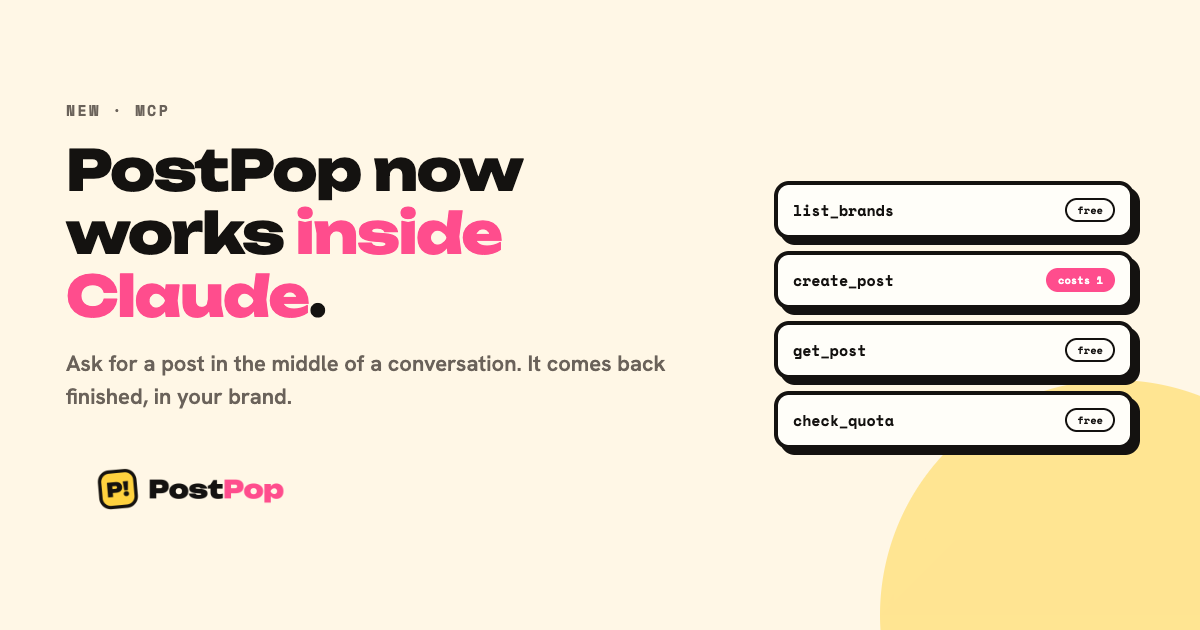
PostPop is now an MCP server. Connect it once and it appears inside Claude as four tools.
What that actually means
MCP is a standard way for an AI assistant to use an outside tool. You paste one block of config, and Claude can call PostPop directly. You never name the tools — Claude works out when to use them from what you ask.
It is the same account, the same brand kits and the same monthly allowance as the Studio. Nothing separate to buy.
Connect it in five minutes
Create an API key in Settings → API keys, copy the config block it gives you, and paste it into Claude Desktop under Settings → Developer → Edit config.
{
  "mcpServers": {
    "postpop": {
      "url": "https://getpostpop.com/mcp",
      "headers": { "Authorization": "Bearer pp_live_…" }
    }
  }
}
Restart Claude and PostPop is there.
The four tools
| Tool | What it does | Cost |
|---|---|---|
| list_brands | Your brand kits — every post needs one | free |
| create_post | Writes and renders a finished post | one post |
| get_post | Fetches something made earlier | free |
| check_quota | Posts used, posts left, reset date | free |
Only create_post spends anything. Its description tells Claude that directly, so it will not quietly work through your month while exploring options.
What it does not do
It does not publish. PostPop makes the post and hands you the files — nothing here can post to your accounts on your behalf, and it cannot read them either.
Who gets it
Agency and lifetime Tier 3. Every call is a real AI generation, which is why it sits on the plans built for running several brands.
Prefer to call it from your own code? The HTTP API is documented at /docs/api.
[Read the full setup guide →](/guides/use-postpop-inside-claude)